Treden founder · developer
From the official BuildIn ambassador in Russia — Kat Pro BuildIn

Pro BuildIn course

The first PRO-level BuildIn course in the CIS.

7 modules — from sign-up to AIPersonal cabinet and workbookTemplates included
Ekaterina, Katya Sistema — Notion systems and custom platform development
Course author

Ekaterina — developer and official BuildIn ambassador in Russia

This course is for you

If you…

  • Want to learn BuildIn from scratch.
  • Are already a confident user and want to learn to build commercial systems.
  • Are looking for ways and tools to be more effective, reach goals and build a “second digital brain”.
  • Want to work with a team and run a business.
What you get

On the Pro BuildIn course

Confident command of BuildIn. An understanding of how to build templates and systems: assembling your own finance tracking system, PARA, personal effectiveness.

Introduction to the BuildIn platform

The platform’s capabilities explained through clear instructions, case studies and formulas, with a deep dive into each lesson’s topic.

Access to lessons and updates for the entire training period

My secrets and BuildIn development lifehacks that I use when building workspaces.

A convenient personal cabinet

Early access to all news and lessons

Access to templates from Kat Pro Notion

Gamification

A chance to exchange earned points for the course author’s goods and services.

A workbook

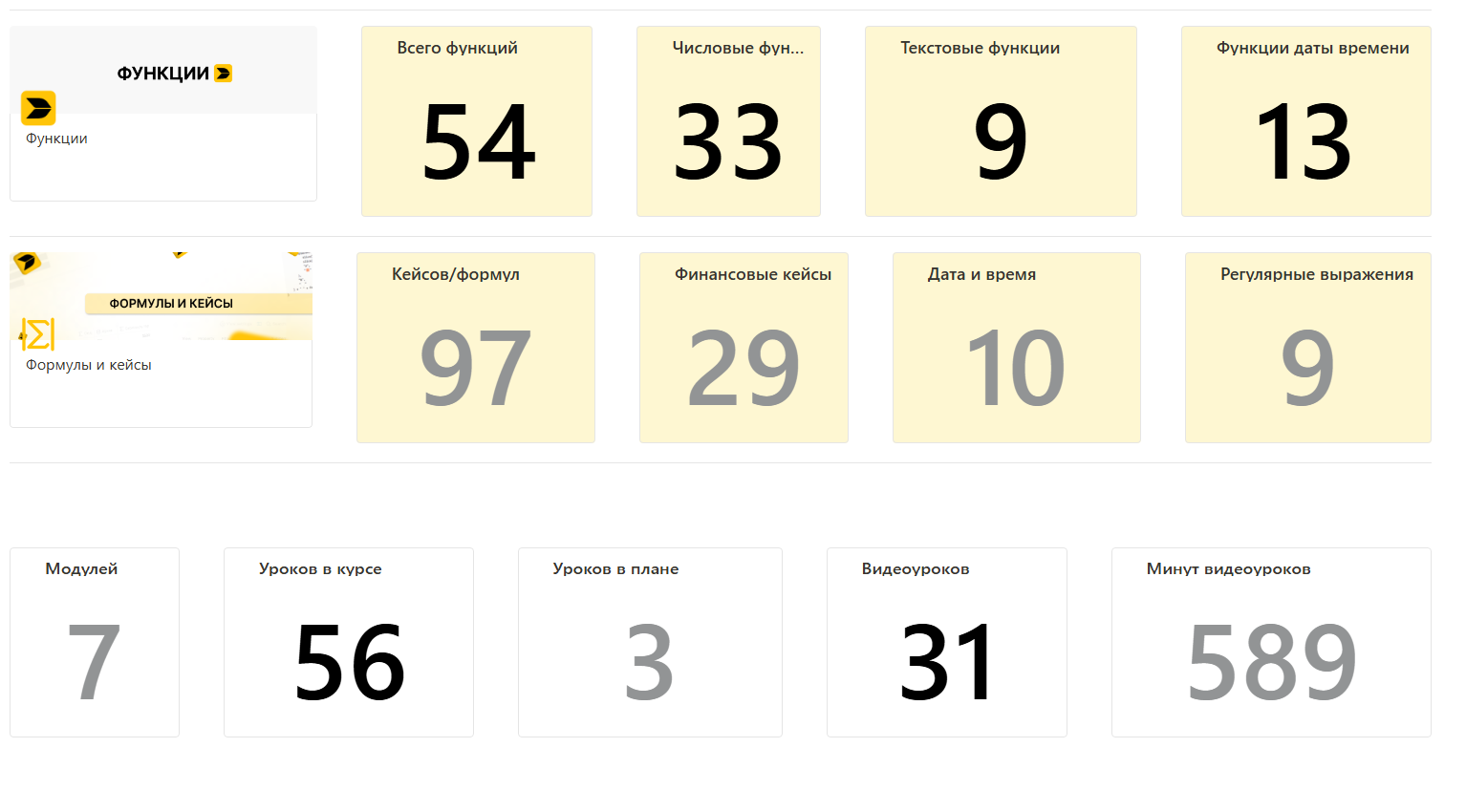
The course in numbers

What’s inside Pro BuildIn

The figures come from the learning cabinet and the course template (cabinet screenshots below).

modules in the course
lessons in the course
video lessons
minutes of video
functions in the template
case studies and formulas
Course program

Seven modules — from sign-up to AI

Module 1. First steps

You’ll download and install BuildIn, get comfortable with the initial setup and be able to import your data from Notion.

  • Introduction: a BuildIn overview, registration
  • Basics: navigation, interface settings
  • Features: templates, Spaces, hotkeys
  • Integrations: importing from Notion
  • Apps: mobile and desktop versions
  • Administration: changing the language, plans
Module 2. Pages

You’ll master creating and configuring pages to work more effectively.

  • Basics: page settings, properties, key elements
  • Design: page header, display options, recommended sizes
  • Practice: building a lead-magnet page, case walkthroughs
  • Efficiency: sync blocks for syncing data and saving time
Module 3. The heart of the system — smart databases

You’ll learn to create, configure and effectively use databases to manage information and tasks.

  • Introduction: database basics, their purpose and properties
  • Creating databases, grouping, sorting, autofilters
  • Database properties
  • Working with notifications and comments, interacting with Person
  • Views: gallery, form, board (kanban), charts and graphs
  • Templates and views
  • Practice: building a database, working with task cards and case studies, filters and autofilters
Module 4. Working with a team

Helps you master team management, workspace configuration and the different plans for effective collaboration.

  • Basics: adding team members to a workspace, differences between plans and their capabilities
  • Practice: a video lesson on building a personal cabinet for an employee
Module 5. Functions and formulas

You’ll master functions and formulas for effective management and analysis of data in databases.

  • Basics: database properties — Number, Person, Relation, Rollup and Formula
  • Working with formulas: usage examples and practical applications for automating calculations and analysing data
  • Notifications and comments: ways to interact with Person
  • Practice: creating and configuring databases, task cards, grouping, sorting, autofilters
  • Data views: gallery, form, board (kanban), charts and graphs
Module 6. Development

You’ll learn hands-on, step by step, to build systems that improve personal and professional effectiveness.

  • Building templates: a step-by-step video lesson
  • A personal effectiveness system: building PARA in practice
  • Money management: a step-by-step guide to building a personal finance system
  • A CRM: building a customer relationship management system
Module 7. Artificial intelligence

The basics of working with AI in BuildIn to automate tasks and improve content.

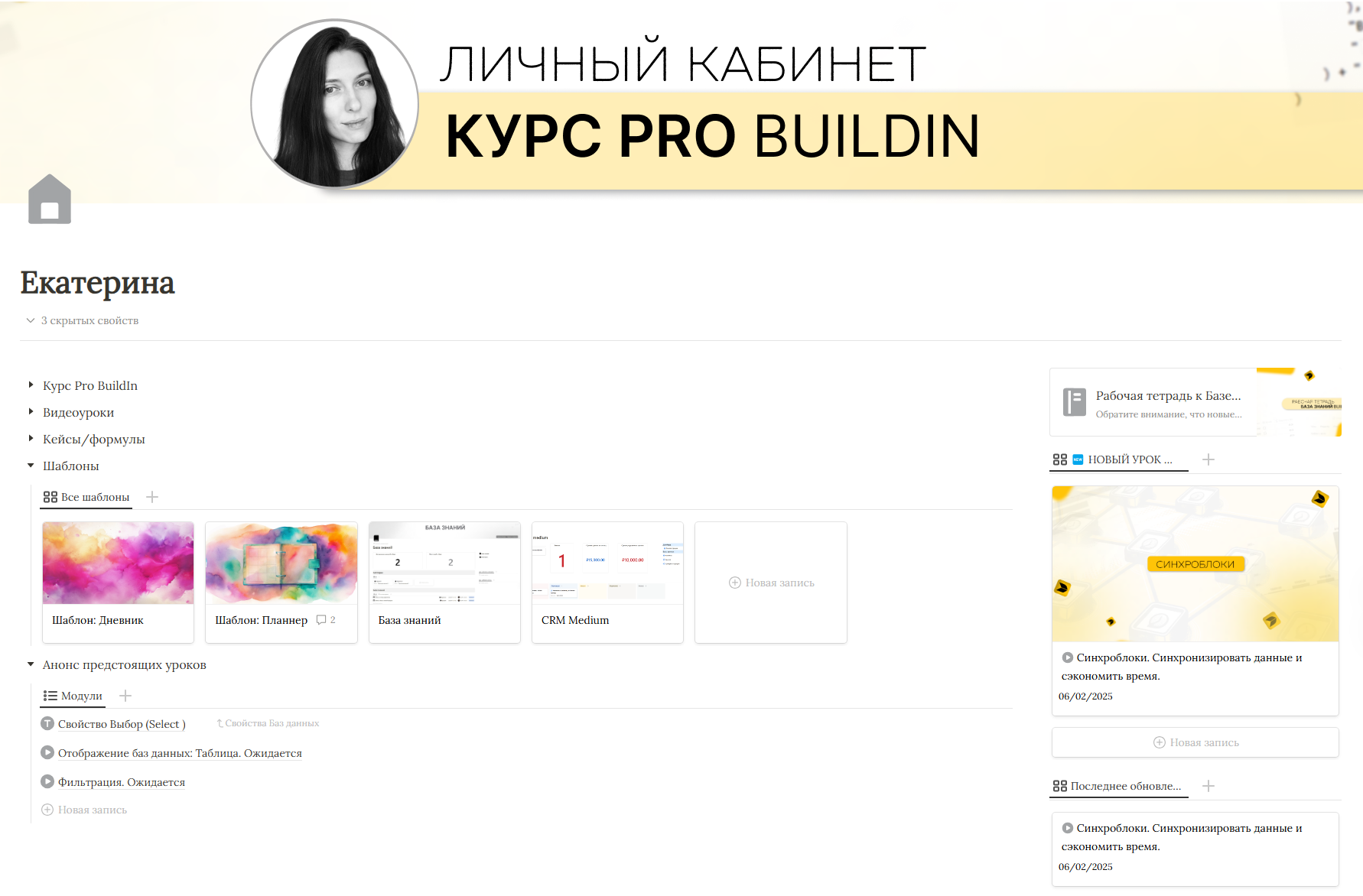
    Personal cabinet

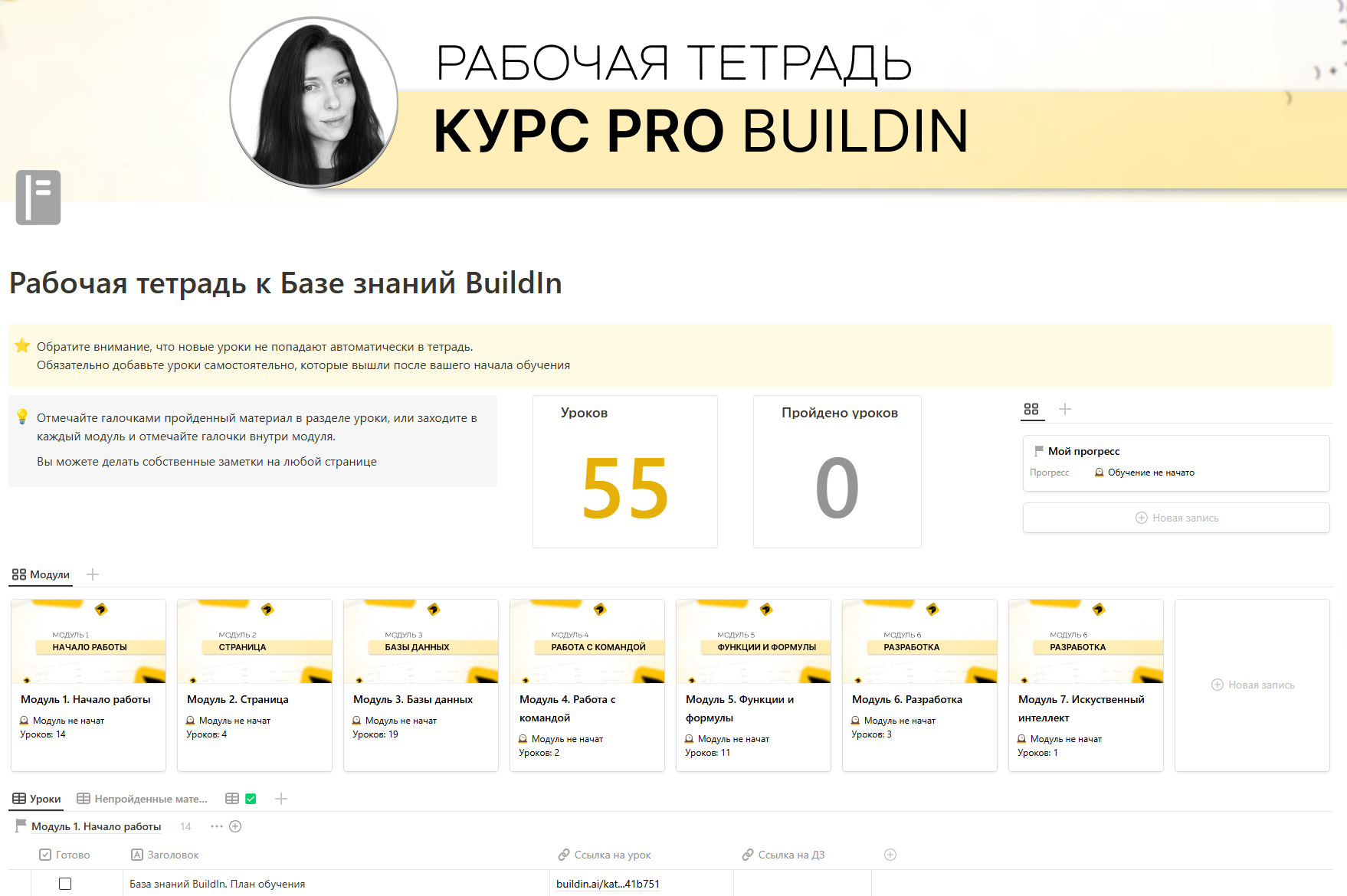
    A convenient cabinet with a workbook

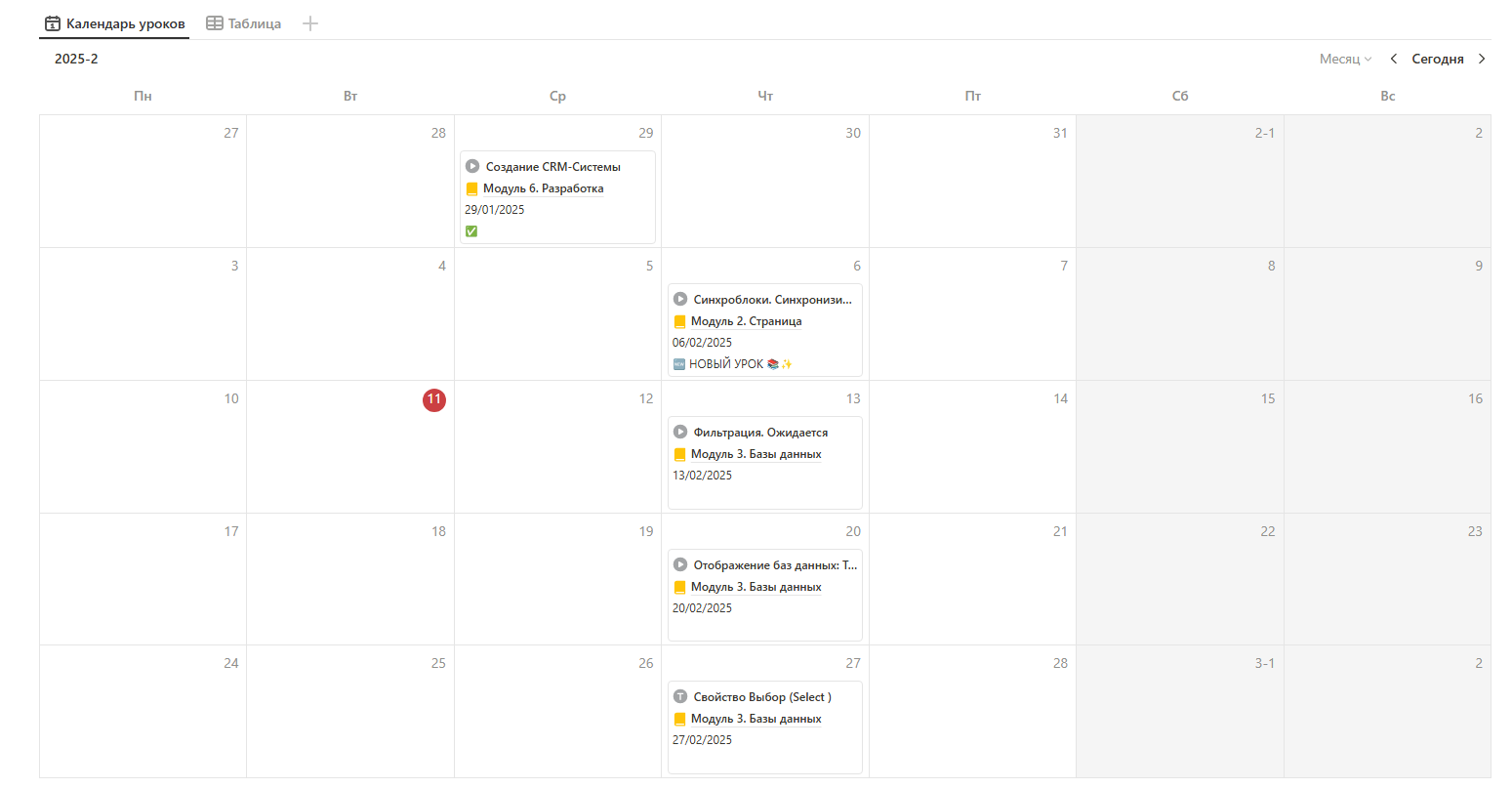
    For the entire training period you get your own personal cabinet with a workbook: video instructions on using it, onboarding, the class schedule, database updates, the ability to comment on lessons and influence the topics — it’s all inside! You won’t miss a thing.

    Pro BuildIn course dashboard — business automationPro BuildIn course dashboard — business automationPro BuildIn course dashboard — business automationPro BuildIn course dashboard — business automation
    Plans

    Three plans — choose your level

    To pay, click the plan of your choice.

    Self-paced

    Basic course
    • Course access
    • A convenient personal cabinet
    • A workbook
    Buy the course

    PRO

    Extended course
    • Course access
    • A convenient personal cabinet
    • A workbook
    • The ability to influence topics and lessons
    • Comment on lessons, ask questions and get answers
    • Access to templates
    • Homework review and feedback (with the feedback plan)
    Buy the course

    VIP Mentorship

    Personal training
    All materials are yours forever; training runs 6 weeks along a personal track
    • Course access forever
    • A convenient personal cabinet
    • A workbook
    • The ability to influence topics and lessons
    • Comment on lessons, ask questions and get answers
    • Access to templates
    • Homework review and feedback for 6 weeks
    • 6 calls of 2 hours each
    • Support between calls
    Message on Telegram
    Testimonials

    What students say

    Olga Basharovatechnical specialist at getCourse
    Sooo many lessons! Let me share my favourites: building the PARA personal effectiveness system — it takes apart exactly how great templates are made, and after that lesson I understood the system as a whole; I’ve watched it to pieces. Database views: Form — creating a form to collect information from clients, an interesting feature I’ll definitely use. Creating a lead-magnet page. Everything in the course is beautifully organised — lessons are easy to find. I love that there are different view types (I use them all)! And thank you for the templates — it’s fascinating to see how they work.
    Denis Tokarev
    Fire! Loved the approach!
    Anastasia Budevichentrepreneur
    Hello Ekaterina! The course is TOP!!! I’m absolutely delighted with the content and the case studies. You explain complex things very clearly. I took a Notion course before, and yours is far more interesting and complete. Thank you for your work!
    Diana SavvateevaHR director
    The lessons are magnificent! Everything is truly simple, clear and very detailed! The course is a genuine treasure trove. It’s great that the course shows you how to extend your favourite templates without breaking anything.
    Student video testimonials about the course
    Templates

    Core templates and almost 100 case studies

    Core templates are included in the PRO and VIP plans. Plus almost 100 case studies accompanying the lessons.

    Diary

    Keep notes, learn, reflect.

    Personal finance

    Track your personal finances.

    Planner

    Plan, achieve, win!

    Knowledge base

    Run a knowledge base — personal or company-wide.

    CRM

    Keep track of your clients.